
Today, we’re excited to announce the general availability of Blueprint Routing, a new enrollment capability in Iru that dynamically assigns devices to Blueprints during enrollment, based on device and user attributes collected at that moment.
Device onboarding that is set it and forget it
With Blueprint Routing, admins no longer need to decide where a device belongs before it enrolls. Instead, devices enter through a single intelligent enrollment flow, with Iru routing them automatically to their destination Blueprint just in time.

This eliminates the need to:
- Pre-assign devices to specific Blueprints
- Distribute different enrollment codes
- Manually move devices after enrollment from “placeholder” Blueprints
- Continuously monitor pre-enrollment device lists and set new assignments
Once Blueprint Routing is configured, admins can truly set it and forget it.
Dynamic assignment during enrollment
Blueprint Routing uses admin-defined routing rules—built with the same, familiar logic as Assignment Maps—to determine where a device should land. Rules are evaluated top-down on a first-match basis, and the device is routed immediately during enrollment.
These rules can evaluate a wide range of attributes, including those already supported by Assignment Maps.
Routing decisions are made only once, during enrollment. After that, the device remains in its destination Blueprint, ensuring a predictable and stable configuration experience.
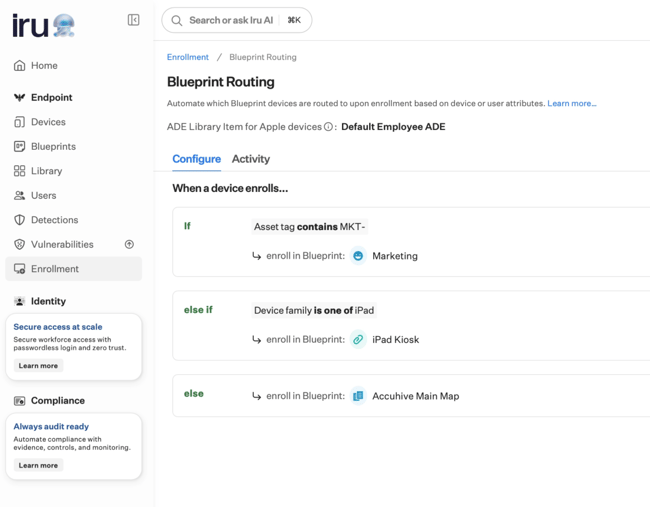
Blueprint Routing + Assignment Maps = ultimate flexibility
Blueprint Routing and Assignment Maps are designed to work together.
- Blueprint Routing determines which Blueprint a device should belong to at the time of enrollment.
- Assignment Maps handle ongoing configuration within that Blueprint using conditional logic.
This combination gives admins complete control across the entire device lifecycle:
- Automated, no-touch enrollment
- Highly customized configuration
- No post-enrollment Blueprint “ping-pong”
Together, they create a workflow where devices are enrolled correctly from day one and continue to receive the right configurations automatically, without constant oversight.
Built for modern enrollment at scale
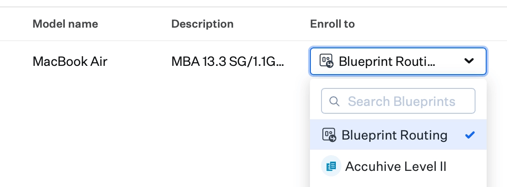
Blueprint Routing supports enrollment across all supported platforms in Iru, and for Apple devices, supports both Automated Device Enrollment (ADE) and manual enrollment flows.
ADE devices assigned to Blueprint Routing remain assigned to Blueprint Routing, allowing them to re-enroll again and again through the same flow, saving admins valuable time.
Full visibility
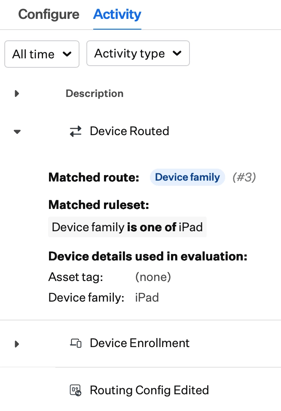
Blueprint Routing also includes a dedicated activity view that records:
- Configuration changes
- Enrollment events
- Routing actions taken during enrollment
These events also appear in device-level activity logs, giving clear insight into how each device was routed.
Tags for ADE devices
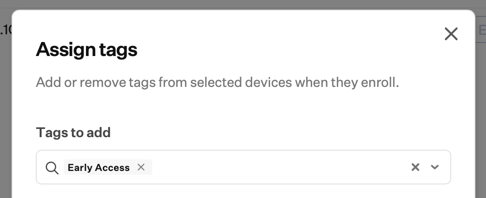
Alongside Blueprint Routing, we’re also introducing the ability to assign tags to pre-enrollment records for ADE devices. These tags can be used in Blueprint Routing rules, and carry through to the enrolled device record for ongoing use in Assignment Map conditional logic.
Blueprint Routing and tags for ADE devices are now available for all Iru Endpoint Management customers.
For more information, see our product documentation: